
The blueprint for scalable AI automation

AI agents are being advertised as the holy grail for automating knowledge work. We are guilty of this too, and even made it our mission to scale productivity 1000x. But where do these productivity gains really come from? And how will agents change the way we work?
In this post, we break down step-by-step what we believe the future of work will look like.
Step 1 — Delegate work to your agents
Getting started with AI agents is easy: just define the task at hand in natural language and you are good to go! But getting agents up and running quickly is not where productivity gains come from.
Enterprise workflows often require near perfect performance. Processing only 90% of invoices or claims correctly is not nearly enough. This means that most of your time is spent obsessing over small details and dealing with edge cases. And because workflow automation is a continuous process, not a one-off, the time spent to set up agentic workflows is negligible compared to the time running and improving them. What really matters is the ability to identify issues and fix them quickly. Iteration speed drives productivity gains.
To iterate fast, you need the following:
- The ability to change task instructions and check the impact on all the agent's outputs straight away.
Many products only let you run and test individual requests, which is not scalable and even counterproductive because it encourages overfitting on just a few data points. Instead, you want to understand how changes affect all your requests.
-
The ability to easily isolate and improve weak points in agentic workflows.
Practically this means being able to divide complex tasks in a series of simpler, standalone ones using specialized agents. Improving the specialized agent is a lot easier than fixing a do-it-all agent with lots of moving parts. You can then combine these specialized agents in workflows and multi-agent systems. -
Real-time analytics on all values generated by the agentic workflow.
Debugging agents can get messy. Scrolling and reading through endless amounts of reasoning traces is the last thing you want to do. Instead, you want to be able to quickly filter and search through all the data, from affected business metrics to LLM predictions, identify and visualize failure modes directly. This requires analytics built into the workflow automation platform.
- The ability to switch between edit mode and production with a click of a button.
There should be no friction at all between testing and deployment.
These requirements let you iterate and steer the behaviour of your agentic workflows in real-time.
Step 2 — Manage your AI workforce
By now our agents are up and running and we need to manage this AI workforce. We don’t want to fall into the common trap where a process is automated, but every decision is still manually inspected, eroding most productivity gains. On the other hand, we want to ensure we can trust the agent’s predictions. So how do we manage agentic workflows effectively?
To manage a fleet of agents we need to make sure that:
- Key business metrics which are impacted by the agents are in line with expectations.
- Edge cases are handled well.
These two objectives make sure that both “business as usual” and tail events are covered.
The key business metrics, or alternatively the metrics which determine the agent’s performance, are defined as part of the agentic workflow by the domain expert. For instance, a claims expert will want to monitor claim payment amounts, claim types and indications of fraud as part of automating insurance claims. This again highlights the necessity of embedding analytics directly into the workflow builder, because the domain expert creating the agentic workflow is also the person who knows best how to monitor its performance. One of the worst things you could do is rely on generic metrics provided by LLM-evaluation tools such as faithfulness, maliciousness or relevance scores. At best these are uninformative for your specific process, at worst they give a false sense of security and let you fly blind.
If a key business or performance metric deteriorates, a dedicated root-cause analysis (RCA) agent is triggered which investigates all available underlying data in real-time to find the main drivers behind this change. The RCA agent acts as your 24/7 data analyst and even creates a tailored report for the domain expert who can then decide on the appropriate action to fix any issues.
There is no silver bullet to perfectly manage the agentic workflow’s behaviour on all instances because new, unknown edge cases inevitably happen over time. We can however manage them well with the following techniques:
-
Allow users to provide direct feedback: 👍 / 👎 with the option to correct values and add textual feedback. Investigate instances with negative feedback and add them to a dataset on which the agents are tested with every change.
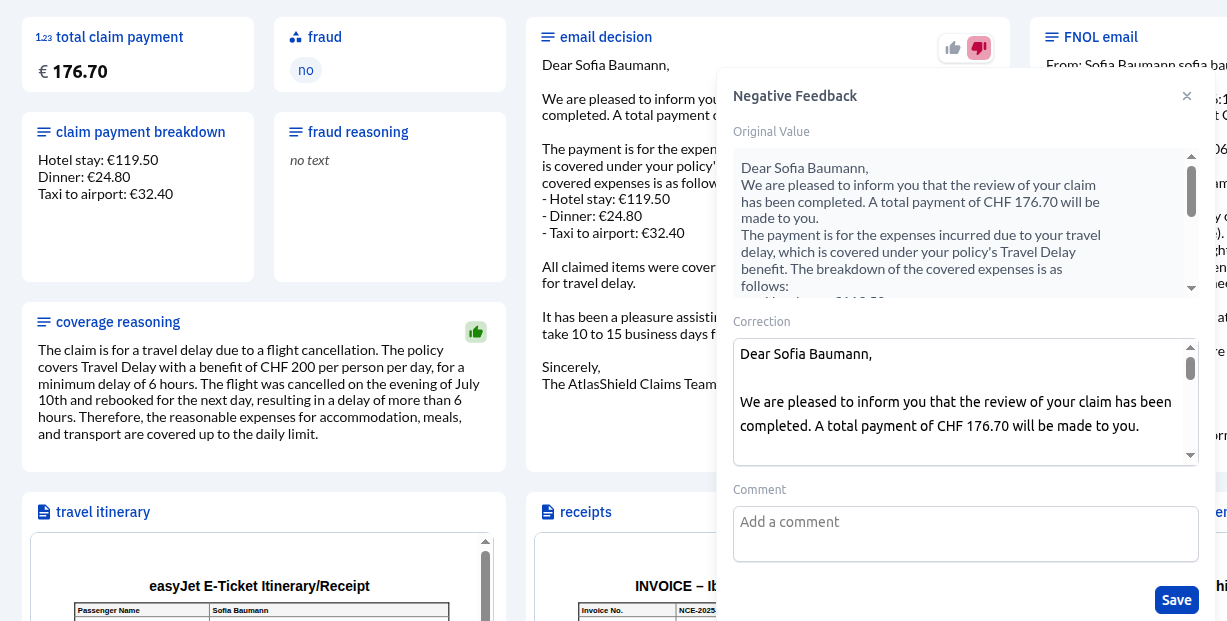
Provide feedback and correct values for agent outputs to improve the agentic workflow. -
Cluster incoming requests and flag new patterns (clusters). When new patterns emerge, investigate their performance and add the instances to the test dataset if needed. Once more, tight integration of analytics within the workflow builder pays dividends.
-
Periodically sample and manually validate the agentic workflow outputs, very similar to sampling inspection in factories.
These methods allow you to quickly identify new edge cases, and make sure future versions of the agentic workflow are always tested against them.
The agentic management layer is where most productivity gains will come from. It’s the difference between running agentic workflows that improve reliably at scale and being constantly stuck firefighting small issues.
Step 3 — Improve your AI workers
At this point we are successfully managing a fleet of agents working tirelessly around the clock. Now it’s time to improve them. There are two ways to do this:
- Iterate manually by changing task instructions and validating outputs. We already covered this in Step 1.
- Use the feedback information from Step 2 to automatically optimize the agentic workflow.
Manual and automated agentic workflow improvements complement each other nicely. Automated improvements are often reactive, since they rely on feedback from historical data. However, there are many scenarios where proactive, manual improvements are most effective.
A good example is when we know that certain edge cases can happen, but haven’t happened yet. Let’s say that we are automating a legal process, and we know the law is about to change. We cannot train on historical cases because correct outcomes under the current law would be incorrect under the new one. The easiest thing to do would be to simply update the agent’s instructions ourselves to reflect the new regulations.
The iteration and improvement layer is where accuracy gets pushed from 95% to >99%.
Depending on the performance requirements of the automated tasks, this is the difference between manually inspecting every output and running the agents autonomously at scale. It can hold the key to unlocking orders of magnitude in productivity gains.
Final thoughts
We are still in the early days of adopting agentic workflows. Many companies have dipped their toes in the water, often testing agents on isolated use cases to pick low-hanging fruit. But as adoption becomes more widespread, it is crucial that best practices about defining, managing and improving these agents are implemented. Otherwise you will quickly be putting out fires around the clock without clear visibility of how AI agents are actually making a difference in your organization.
We built our Decision Computing platform with this 360 degree approach to building, monitoring and improving agentic workflows in mind.
Ready to scale mission-critical automation?
Stop firefighting and start scaling. Deploy the 360-degree agentic platform required for >99% accuracy.

Legal
Privacy policyGet the latest product news and updates.